DevOps

MikroTik Dual WAN Failover & Policy-Based Routing

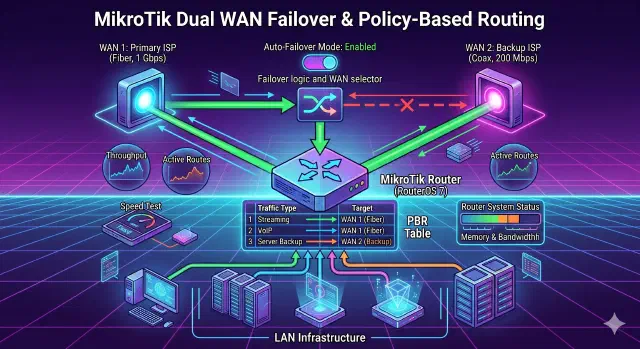
Configure dual-WAN failover and policy-based routing on MikroTik RouterOS v7 so your backup link takes over automatically and selected destinations always use a specific WAN.

MikroTik RouterOS v7: Dual WAN Failover & Policy-Based Routing

If you have a MikroTik router and two internet connections (a primary high-speed line and a secondary backup line), you probably have two goals:

  1. Automatic Failover: If the Main Connection drops, the router should switch to the Backup Connection automatically.
  2. Policy Routing: You may want to force specific destinations (like a work server, a gaming server, or a specific streaming service) to always use the for example Backup Connection, regardless of the main connection status.

This guide covers how to set this up using RouterOS v7 via the Command Line (CLI).

Setting Up Cloudflare Tunnel: A Modern Alternative to Ngrok

Setting Up Cloudflare Tunnel: A Modern Alternative to Ngrok

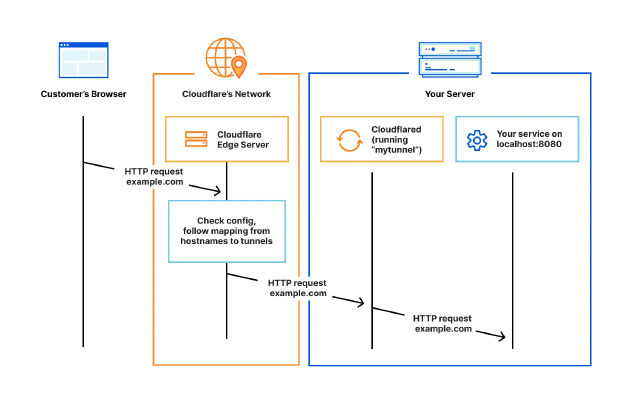
Learn how to securely expose your local services using Cloudflare Tunnel

Quick and Free Way to Share Your Local Docker Service with Clients

Ever been in that situation where you’ve built something cool in Docker and want to quickly show it to your client? Yeah, me too. Recently, I was wrapping up a database admin panel project and needed a way to let my client review it before the final deployment.

My go-to solution used to be Ngrok. It works, but the free tier gives you random URLs that look like 8f4d-192-158-1-38.ngrok.io. Not very professional when sending to clients, right? Plus, these URLs change every time you restart the tunnel.

How to Configure S3 Access for AWS App Runner A Complete IAM and VPC Setup Guide

Introduction

When deploying applications on AWS App Runner, you may need to access S3 buckets to store or retrieve data. However, by default, App Runner services don’t have permission to interact with S3. This guide aims to solve that problem by walking you through the process of granting your App Runner service secure access to S3 buckets.

We’ll achieve this by:

  1. Creating an IAM role with the necessary S3 permissions
  2. Configuring your App Runner service to use this role
  3. Setting up networking components (if using a VPC) to ensure connectivity

By following these steps, you’ll enable your App Runner service to securely read from and write to S3 buckets, allowing for seamless integration of S3 storage in your application.

How to Restore Files from Glacier on Amazon S3 Storage using Bash Script

How to Restore Files from Glacier on Amazon S3 Storage using Bash Script

Amazon S3 storage is a popular cloud storage service that provides scalable object storage for data backup, archive, and disaster recovery. One of the storage options available on Amazon S3 is Amazon Glacier, which provides a low-cost, long-term storage solution for data archiving and backup. However, retrieving data from Amazon Glacier can be time-consuming and expensive. In this tutorial, we’ll show you how to restore files from Glacier on Amazon S3 storage using a Bash script.